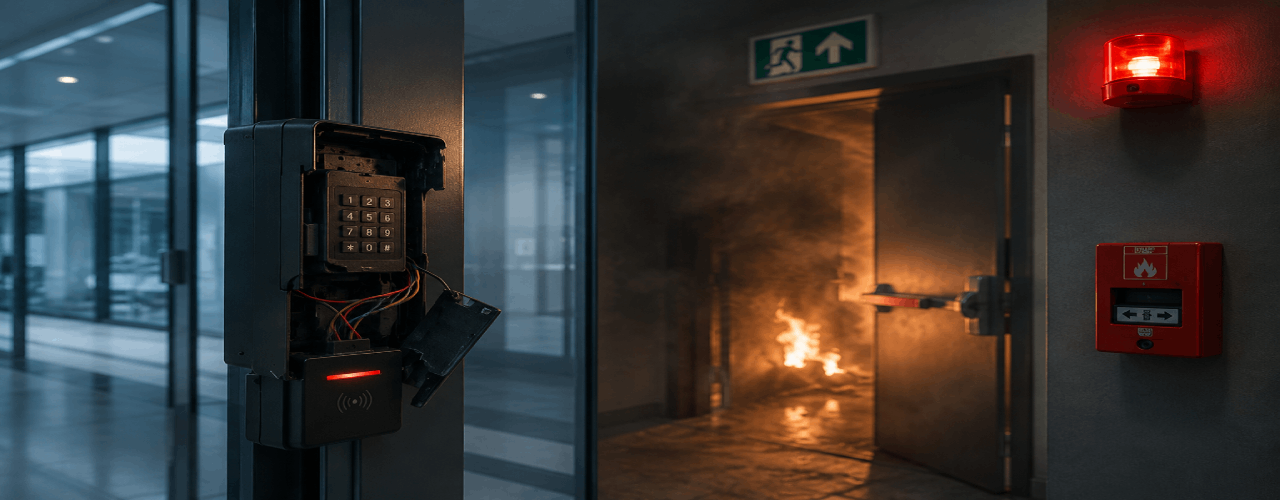
When Access Control Fails, It Becomes a Life Safety Risk
A locked door has never saved a life. It’s only ever taken one.
Every access control system is built to keep people out. Almost none are built to let people out — fast, under panic, when the power’s gone and nobody remembers a passcode.
We keep seeing the same failure pattern in hospital fires, coaching centre fires, industrial accidents, basement flooding: the exit was there. The door wasn’t.
Magnetic locks that stay engaged when the panel dies. Biometric scanners that don’t recognise a shaking hand. Exit switches nobody can reach in smoke. Overrides that were never tested. Fire alarms that were never wired in.
None of this is exotic. It’s design that stopped at “who gets in” and never asked “what happens when everyone needs to get out at once.”
That question is where we start — not where we arrive eventually, after something goes wrong.
Access control was never just about entry
For years, businesses relied on locks and keys. Traditional locks create blind spots: duplicate keys, lost keys, no entry records, zero accountability. That’s why businesses moved to electronic access control — RFID cards, biometrics, PINs, mobile credentials.
But access control isn’t just a gatekeeper. A properly designed system runs on four things working together:
Authentication — confirming who someone is (a card tap, a fingerprint, a face scan).
Authorization — controlling what they’re allowed to reach. Staff get the office floor; IT gets the server room; visitors get reception.
Monitoring — logging entry and exit times, failed attempts, forced doors, doors left open.
Audit trails — the record that tells you who was where, and when, after something happens. This is the one mechanical locks can never give you.
Get all four right and a door stops being a single point of failure. It becomes part of how the building runs — and part of how it responds when something goes wrong.
Where the design usually breaks
A professionally designed access system has to assume the worst day, not just an ordinary one. That means:
- Fire alarm integration, so a fire signal releases doors automatically
- Emergency release buttons that work without power
- Fail-safe locking logic — the door defaults to open, not locked, when it loses power
- Battery backup long enough to cover an evacuation
- Panic exit logic that doesn’t depend on anyone authenticating anything
Most installations skip at least one of these, usually because nobody asked about it at the time of sale. It’s rarely a hardware failure. It’s a design conversation that never happened.
Security should never trap people. A secure door is also, by definition, a safe exit — the two aren’t in tension, they’re the same requirement seen from two directions.
Choosing the right technology
Not every door needs the same level of authentication.
| Factor | RFID | Biometric |
| Cost | Lower | Higher |
| Security | Medium | High |
| Speed | Very fast | Fast |
| Scalability | Excellent | Good |
| Identity accuracy | Medium | Very high |
In practice, the strongest setups are hybrid: RFID for general staff movement — offices, warehouses, housing societies, high-traffic points — and biometrics reserved for the doors where identity actually matters more than speed: server rooms, labs, finance offices, restricted departments. Mobile credentials (NFC, Bluetooth, QR) are the fastest-growing layer on top of both, particularly for visitor access in premium and co-working spaces, where issuing a physical card for a two-hour visit doesn’t make sense.
Hardware matters as much as software
A strong access control platform behind a weak door is a false sense of security.
Magnetic locks hold well and integrate easily with glass and main entrance doors — but only if they’re wired with a proper emergency release, since by nature they fail locked unless designed otherwise.
Electric bolt locks offer better physical resistance for wooden or metal doors and restricted rooms.
Exit buttons are never optional. Every secured door needs one, full stop.
Remote access controls at reception or guard stations let staff verify visitors and manage deliveries without walking to every door.
The mistakes we see most often
Buying on price alone. Cheap controllers and locks are usually the first thing to fail — and they fail quietly, until the day they don’t.
Treating exit as an afterthought. Entry security means nothing if the same door won’t open outward when it needs to.
Strong lock, weak door. A commercial-grade lock on a hollow or poorly framed door protects nothing.
No power backup. A power cut should never decide whether your building is secure — or whether people can leave it.
No room to grow. Systems that can’t add doors or users without a full re-install become expensive within two years.
What to ask before you buy
- How many users, how many doors, today and in two years?
- What security level does each door actually need?
- Does it need to integrate with attendance systems?
- Is fire alarm integration required — and has it been tested, not just installed?
- Is there battery backup, and how long does it last?
- Is the hardware genuine, or a cheaper substitute sold under the same spec sheet?
These questions matter more than any brand name on the panel.
Our position
At eTransit, we design access control around real movement and real risk, not a product catalogue. That means every deployment accounts for emergency logic, compliance needs, and future expansion from day one — not as an add-on after a near-miss.
Because the best access control system isn’t the one that keeps threats out most efficiently. It’s the one that protects the people inside it, especially on the one day it’s tested for real.
Secure access. Safe exits. Full accountability. That’s not three separate goals — it’s one system, designed properly.
Forethought. Not Afterthought.
Author